


Ethiopian Bible
3.258.00 Reviews
App Specs
- Version
- 2.5.0
- Updated On
- License
- Free
- Downloads
- 100,000+
- Developer
- GeezApps
- Categories
- Books & Reference
- Platform
- Android
Screenshots
 Analysis by AppCompare
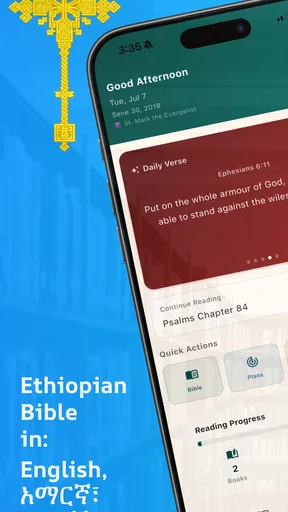
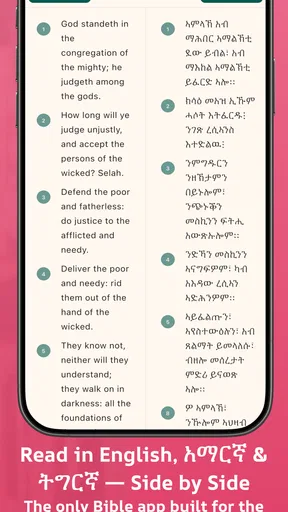
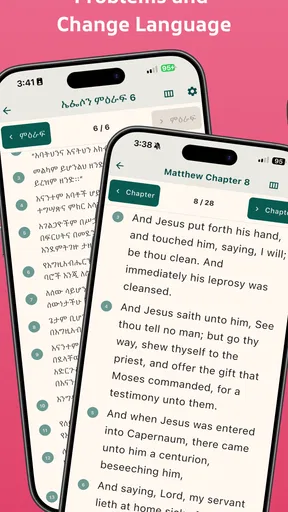
I found Ethiopian Bible most useful when I treated it as a shared reading tool rather than just another Bible app. Developed by GeezApps, it brings English, Amharic, and Tigrigna text into one free Books & Reference app, which makes it especially practical in a household where people may read the same passage in different languages. I could move between language choices without carrying separate books, and that simple convenience is the reason I would recommend trying it.
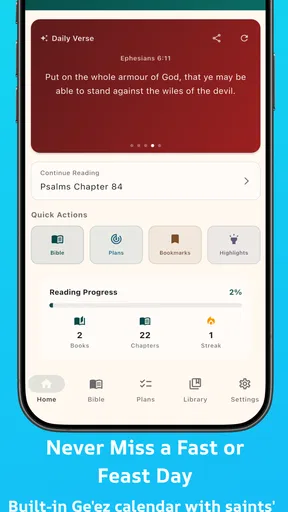
The app is aimed at everyday reading, quick reference, and family or community study. Its store summary presents it as a complete Bible in your pocket, and that is the right way to understand its appeal: it is compact, accessible, and focused on scripture rather than a large collection of extra tools. The experience is not about turning Bible reading into a social network or a heavily personalized study platform. Instead, it gives readers a straightforward place to open the text and begin.
How it works in a shared household
A realistic use case is a home where one person is more comfortable reading English while another prefers Amharic or Tigrigna. During an evening reading session, one family member can use the English wording to follow the discussion while another checks the same passage in a preferred Ethiopian language. That removes a common source of friction: deciding which single-language edition everyone must use.
I also see value in a shared phone or tablet. If the device stays in a living room, the app can serve as a convenient reference for a parent, grandparent, visitor, or younger reader. Because the app is free, a household does not have to make a purchase decision before testing whether the three-language approach fits its routine. The Everyone content rating also makes the subject matter suitable for general household use, although that should not be confused with built-in child supervision.
The strongest household feature is language flexibility, not account sharing. I would not assume that every person using the same device has a separate profile, private reading history, or personal settings. If several people take turns reading, the safest routine is to leave the app at a neutral place when finished and avoid treating one device as a private account. That small habit matters when a phone or tablet is regularly passed around.
For a family discussion, I would prepare the passage before everyone gathers. Open the relevant book and chapter, choose the language needed by the first reader, and keep the device visible rather than passing it constantly. If someone wants to compare wording, switch languages at that point and return to the shared passage afterward. This is more efficient than asking each person to search independently while the conversation is already underway.
What the three-language approach changes
English makes the app approachable for readers who already use English study materials, while Amharic and Tigrigna make it more relevant to readers who want Ethiopian-language scripture close at hand. The benefit is not merely translation variety. In a mixed-language household, people can discuss a passage without forcing everyone to interpret it through a language that feels less natural.
Worth Reading Before You Choose

EA SPORTS FC Mobile 26 Is a Bigger Football Game, but It Takes Time

Flipboard Shows What News Apps Must Do Beyond the Feed

Switching to Android Auto Means Rethinking Your Driving Routine

Google Calendar Makes a Crowded Week Easier to Manage

Ludo King Makes the Most of the Minutes Between Plans

Baby Panda World Brings Quick Play to Modern Phones, but Its Game Library Feels Busy
There is also a useful learning angle. A reader can first read a familiar passage in Amharic or Tigrigna, then consult the English version to notice differences in expression and vocabulary. I would use this as a gentle language-learning exercise, not as a replacement for a dedicated language course. The Bible’s repeated phrases and familiar structure provide a natural way to compare wording, but the app’s main purpose remains reading scripture.
One trade-off is that switching languages can interrupt the rhythm of a devotional session if the interface makes the reader navigate away from the passage. My practical advice is to decide in advance which language will lead the reading and use the other versions only for selected comparisons. That keeps the meeting focused and avoids turning every verse into a navigation task.
Setting boundaries before other people use the device
On a shared phone, setup is less about creating a family system and more about agreeing how the app will be used. I would first make sure everyone knows which language they normally prefer. If an older relative uses Amharic or Tigrigna and a younger reader uses English, that simple agreement prevents repeated changes during a reading session.
I would also establish a clear device routine. One person can open the passage, another can read aloud, and the device can remain with a designated reader. This works better than allowing everyone to tap around at once, particularly when the screen is small. When the session ends, return to a familiar starting point so the next person does not have to guess where the previous reader left off.
The app is free, but free access does not automatically mean a household has unlimited offline convenience, private profiles, or synchronized progress. I would avoid promising those things to family members. Instead, I would judge the app on what it clearly does well: keeping Bible text in three languages available from one place. If your household depends on detailed notes, cloud synchronization, or separate reading plans, a more feature-heavy Bible service may be the better primary tool.
For a personal phone, the setup is simpler. Choose the language that matches most of your reading, then use the other versions when you need comparison. For a shared device, write down or agree on the current book and chapter if your group follows a schedule. That is a low-tech solution, but it prevents the common problem of several users assuming the app will remember each person’s place separately.
Coordinating reading without overcomplicating it
I would use Ethiopian Bible as the common text during a small family reading, church discussion, or informal study group when participants need English, Amharic, and Tigrigna access. One person can lead from a chosen language, while others follow in their own. This arrangement is particularly helpful when the goal is discussion rather than silent individual reading.
A good workflow is to announce the book and chapter aloud before opening the passage. Ask everyone to settle on a language, read the section once without interruption, and only then compare selected verses. That order keeps language comparison from overwhelming the meaning of the passage. It also helps younger readers participate without waiting through repeated searches.
For remote coordination, I would treat the app as the reading source and use whatever separate communication method the group already trusts for scheduling. The app itself should not be presented as a complete coordination platform. Its contribution is that participants can consult corresponding scripture in several languages, not that it manages invitations, reminders, or group assignments.
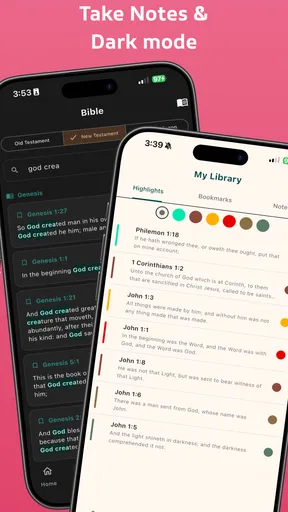
Another useful routine is to give each person a role. One reader handles the English text, another follows Amharic, and another checks Tigrigna when a wording question comes up. This makes the multilingual design active rather than decorative. It also reveals an important limitation: if the group wants synchronized highlighting, shared annotations, or live collaboration, this focused app may feel basic compared with a larger study platform.
In my experience, the best results come when the app remains in the background of the conversation. It should make the text easier to reach, not become the subject of the meeting. If users constantly need to search, adjust views, or recover a previous location, the group should simplify its plan and use one main passage at a time.
Age, trust, and realistic expectations
The Everyone rating fits the app’s purpose as a general scripture reader. I would feel comfortable introducing it to a household with different generations, provided the device itself is used responsibly. The rating describes the broad suitability of the content; it does not create a supervised environment or guarantee that every device interaction is appropriate for every child.
For younger readers, an adult can choose the passage and read together with them. That is more useful than handing over the device with no guidance, especially if the child is still learning how to navigate books and chapters. A shared reading habit also helps children understand that the app is a reference tool, not simply another screen-based distraction.
Trust matters in a different way for adults sharing one device. Someone may want to read privately, while another person may use the app for a group session. Since I would not rely on separate household profiles, I would keep personal expectations modest. If privacy is important, use an individual device and avoid leaving a passage open where another person can casually see it.
The developer, GeezApps, has kept the product identity clear: this is a Bible app in the Books & Reference category, not a general-purpose family organizer. That clarity is helpful, but it also sets the boundary of what I expect. I look to it for accessible scripture in the listed languages, not for parental controls, household accounts, or a complete curriculum for children.
Reading comfort and everyday usefulness
The app’s value becomes clearest in small moments. I could imagine using it when someone asks about a passage during a conversation, when a family member wants to read in Amharic before discussing the English wording, or when traveling without room for multiple printed editions. Having the text on a phone removes the need to search through several books before the discussion can begin.
It is also useful for readers who move between languages during the week. A person might read devotional material in English but prefer scripture in Tigrigna, or use Amharic at home and English in a study group. Keeping those options together reduces the need to maintain multiple apps with different interfaces.
Still, a digital Bible is not automatically better than a printed one. A paper edition remains easier for some people to annotate, lend, or read without notification distractions. If you prefer a physical page, extensive marginal notes, or a carefully organized study library, Ethiopian Bible may work best as a portable companion rather than your only Bible.
The version listed for the app is 2.5.0, and it runs on Android 7.0 or later. That makes it relevant to people keeping an older Android device in service, including a spare household phone. Before setting up a shared device, I would check that the operating system meets that requirement and that the screen is comfortable enough for the intended reader. Older hardware may be perfectly adequate for reading, but small displays can still make shared sessions tiring.
The app was released on February 14, 2026, and its reception is mixed rather than universally enthusiastic. It holds a 3.2 average from around 193 ratings, alongside around 56 written reviews. I read that as a reason to approach it practically: test the reading flow, language switching, and chapter navigation yourself instead of assuming that the short store description tells the whole story.
Its reach is meaningful, with over 100 thousand installs, but popularity alone does not answer whether it suits your household. A multilingual family may find more value in it than a reader who needs only one language and advanced study tools. Conversely, someone seeking a polished research environment may prefer an established Bible platform with stronger note-taking and cross-reference features.
Where it fits beside familiar alternatives
Compared with a printed Ethiopian Bible, the app wins on portability and language switching. A single phone can replace the need to carry separate language editions to a meeting. The printed book wins on tactile reading, easy group passing, and freedom from battery or screen concerns. For many households, keeping both is sensible: the app for quick access and comparison, the book for longer, quieter reading.
Compared with a general Bible app, this one stands out because Amharic and Tigrigna are central to the experience rather than an afterthought. A large international app may offer more plans, commentary, audio, highlighting, or social functions, but those extras do not compensate if the language you need is missing or awkward to reach. I would choose this app when language access is the deciding factor.
Compared with a web-based Bible site, a dedicated app feels more natural for repeated phone use. You can open one installed tool instead of starting a browser search each time. The trade-off is that a website may offer broader search options or more translations in one place. If your study involves comparing many editions beyond English, Amharic, and Tigrigna, a web resource could be more flexible.
Compared with a specialized study Bible, Ethiopian Bible is likely to feel intentionally restrained. That is good for readers who want the text without a crowded screen, but limiting for anyone who expects scholarly notes, maps, original-language tools, or extensive cross-references. I would not make it the only app for serious academic study unless its available reading tools already meet your needs.
Who should use it and who should look elsewhere
I think it is a strong match for a multilingual Ethiopian household, a reader who wants Amharic or Tigrigna scripture on a phone, and a small group that needs a common digital text in more than one language. It is also a sensible free starting point for someone who has never used a Bible app and wants a focused experience rather than a large ecosystem.
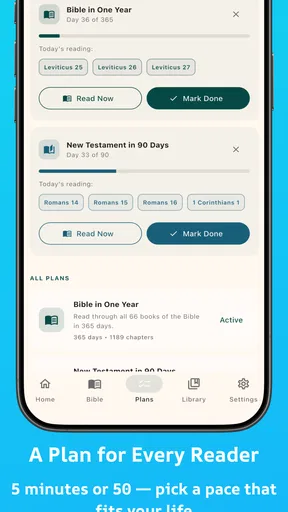
I would be more cautious if your priority is private multi-user organization. A shared device can work, but you should coordinate manually and avoid assuming that each family member gets an independent space. Likewise, readers who need a formal reading plan, detailed annotations, audio, or advanced study references should compare it with a fuller Bible platform before switching completely.
There is another important distinction for households: shared access is not the same as shared interpretation. The app can place several language versions within reach, but it cannot resolve differences in translation or replace thoughtful discussion. When a verse sounds notably different across languages, treat that as an invitation to consult a trusted printed edition, teacher, or study resource rather than assuming one wording settles the question.
Because it is free, I would install it first on the device that will actually be used for reading, not merely on a spare phone that nobody carries. Test one familiar passage in each of the three languages. Then try the household routine: one person leads, another follows, and a third checks a different language. That short trial will reveal more about its suitability than a quick glance at the icon or summary.
My household verdict
For multilingual Bible reading, Ethiopian Bible is a practical and focused choice. I like that its purpose is easy to understand and that English, Amharic, and Tigrigna can support the same household conversation. The free price removes a barrier, the Everyone rating suits general family use, and the modest system requirement means it can serve on an older Android phone that might otherwise sit unused.
My recommendation comes with clear boundaries. I would use it as a shared reading reference, a language-comparison aid, and a portable companion to printed scripture. I would not present it as a full family-management system or as a replacement for a feature-rich study Bible. Shared-device users should agree on a simple routine, keep expectations about privacy realistic, and decide which language leads each session.
GeezApps has made the most important choice correctly by centering access to Ethiopian-language scripture alongside English. That makes the app more relevant to a specific audience than a generic Bible reader can be. If your household regularly moves between these languages, the convenience is tangible. If you need deep research tools or personal account separation, another option may serve you better.
Overall, I would recommend giving it a fair trial for everyday reading. Start with one family passage, compare the language options, and see whether the navigation feels comfortable for the people who will actually use it. For the right household, that simple multilingual access is enough to make the app worth keeping close.
Pros
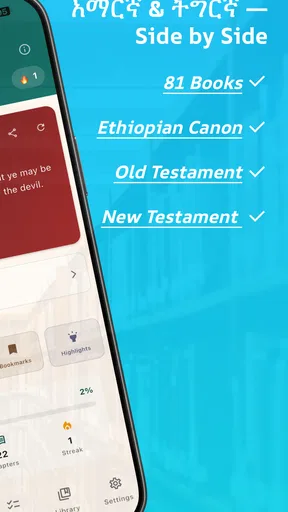
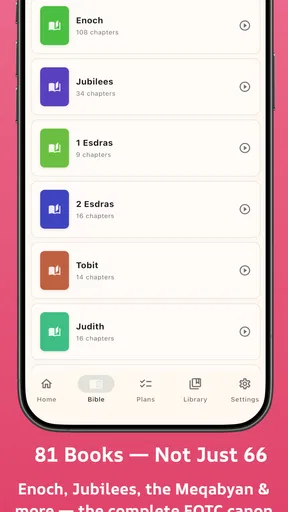
- Includes Ethiopian Orthodox Bible books rarely found in standard Bible apps.
- Works offline
- making scripture accessible without a constant internet connection.
- Simple navigation helps users find books
- chapters
- and verses quickly.
- Useful for personal devotion
- study
- and learning about Ethiopian biblical tradition.
- Usually lightweight and suitable for older Android devices with limited storage.
Cons
- Translation quality and wording may vary depending on the selected edition.
- Some features may be limited compared with larger Bible study applications.
- Ads can interrupt reading or appear between sections in the free version.
- Search tools may be basic and less effective with spelling variations.
- iOS availability and update support may differ from the Android version.
FAQs for Ethiopian Bible
What is the Ethiopian Bible app?
Ethiopian Bible is a mobile reading app designed for users who want to access Ethiopian biblical texts on an Android or iOS device. Depending on the edition and app version, it may include books associated with the Ethiopian Orthodox Tewahedo tradition, along with reading tools such as chapter navigation, search, bookmarks, and adjustable text settings. Check the store description to confirm the exact contents before downloading.
Does Ethiopian Bible work offline?
Offline availability can vary between versions of the Ethiopian Bible app. Some editions allow the biblical text to be downloaded or accessed without an internet connection, while others may require connectivity for loading content, advertisements, updates, or additional resources. After installation, test several chapters in airplane mode to confirm offline access, especially if you plan to read while traveling or have limited mobile data.
Which languages and Bible books are included?
The included language and book collection depends on the specific app edition. Many Ethiopian Bible applications focus on Ge’ez, Amharic, or related Ethiopian Christian texts, but not every version contains the complete canon recognized by the Ethiopian Orthodox Tewahedo Church. Before downloading, review the screenshots, description, and book list carefully to verify language support, translation style, and whether the books you need are available.
Is Ethiopian Bible free to download and use?
Most Ethiopian Bible apps can be downloaded at no initial cost, but the exact business model differs by developer. A free version may contain advertising, optional purchases, or locked features such as advanced search, additional translations, audio content, or ad removal. Review the Google Play or App Store listing and the in-app purchase information before installing so you understand whether any reading tools require payment.
Is the Ethiopian Bible app suitable for study and church use?
The app can be useful for personal devotion, daily reading, and carrying biblical material to church or study groups, particularly when it offers reliable navigation, bookmarks, search, and readable typography. However, users should confirm the translation and source before using it for formal teaching or theological study. Digital editions may differ in spelling, formatting, or canon, so comparing important passages with an approved printed or church edition is recommended.


